Packages
Two NuGet packages
StoreCanvas.Umbraco is the shop, with its backoffice and public API. StoreCanvas.Storefront adds the pages shoppers use.
See the packages and requirementsE-commerce plugin for Umbraco 17
StoreCanvas is a commercial e-commerce plugin for Umbraco 17 (.NET 10), made by Datapad in the Netherlands. It adds a product catalog, cart, checkout and orders to an Umbraco site, with payments through Mollie, Stripe, PayPal or bank transfer.
Packages
StoreCanvas.Umbraco is the shop, with its backoffice and public API. StoreCanvas.Storefront adds the pages shoppers use.
See the packages and requirementsPayments
Or bank transfer: the shopper transfers the money and you mark the order paid.
See the payment providersTax
Dutch BTW, EU VAT with OSS and reverse charge, US sales tax, Canadian GST/HST, or a tax of your own.
See the taxes it calculatesShipping
Flat rates by country and weight, pickup at the shop, and carrier rates and labels through Shippo.
See the shipping optionsPrint on demand
Paid orders go to the partner that makes and ships them.
See all providersThe demo shop
The shop's products, pages and settings live in the same backoffice as the rest of your site.
Catalog
Products and categories live in Content, with options and choices, pictures, stock and prices. Edit them where you edit the rest of the site.
Offers
An amount or percentage off, 3 for 2, combinations, gifts and codes, each with a start and an end if you like.
Accounts
Shoppers register, see their orders and reset their password. A guest finds an order by its number and email address.
Downloads
Sell files next to things you ship. The files are kept in the shop's database, and only the shopper who bought one can open it.
Emails
To shoppers and to the shop, in the shopper's language, sent over SMTP or through CampaignCanvas, and saved as files while you develop.
Backoffice
An Overview with a set-up checklist, Products with Export as CSV, Orders, Offers and Emails, and Settings for the store, services, import and licence.
Stock
Low-stock and sold-out labels on the shop's pages, and an email to shoppers who asked to hear when a product is back.
Headless
A headless shop installs only StoreCanvas.Umbraco and builds its own pages on the API under /api/storecanvas.
Import
Import products from a Shopify store, or export them as a CSV file, edit them in a spreadsheet and import them again.
Hooks
Send the shop's events to them, signed, and with CampaignCanvas send the shop's emails in one of its email themes.
Feeds
A product feed with every active product, ready for Google Merchant Center or Meta Commerce Manager.
The backoffice
Screenshots of the demo shop's backoffice, with fictional products and test orders.
Overview
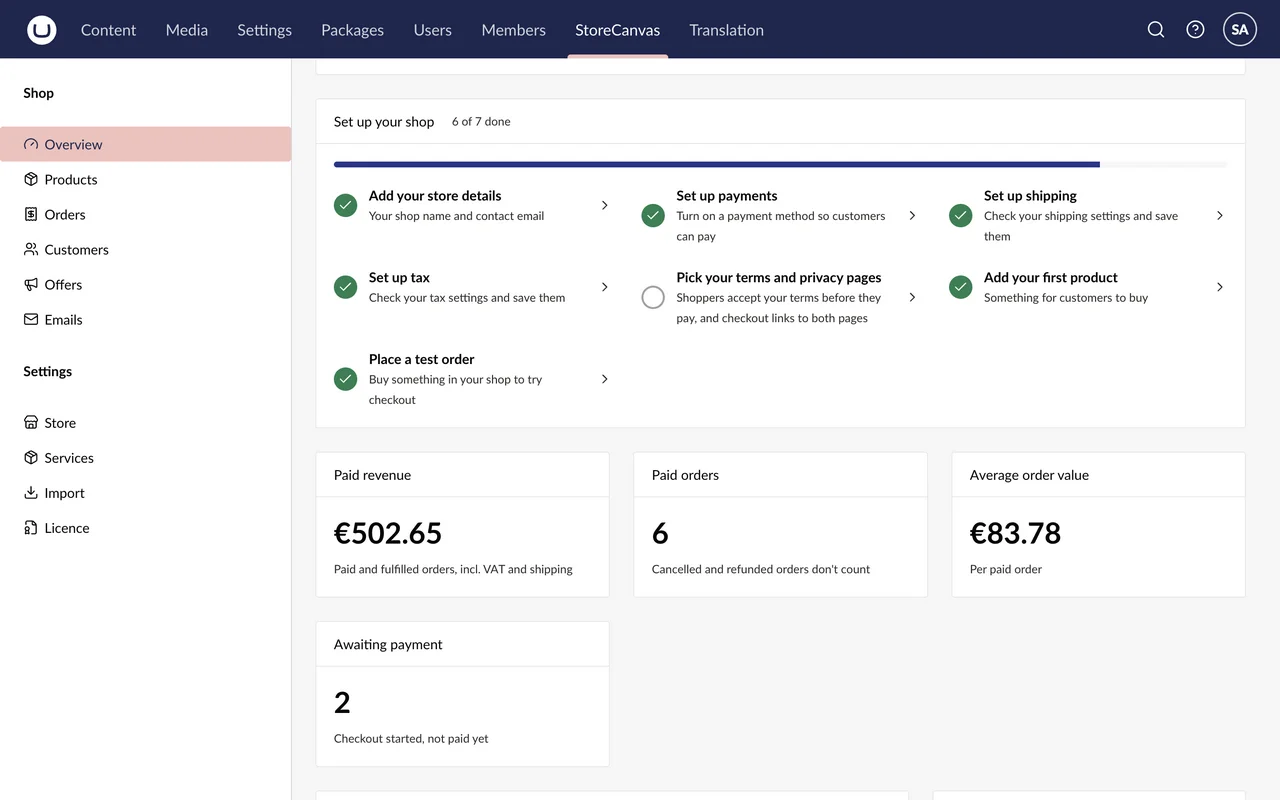
Paid revenue, paid orders and the average order value for today, 7 or 30 days, and what needs your attention. The set-up checklist shows what's done and what's left: store details, payments, shipping, tax, terms, a first product and a test order.
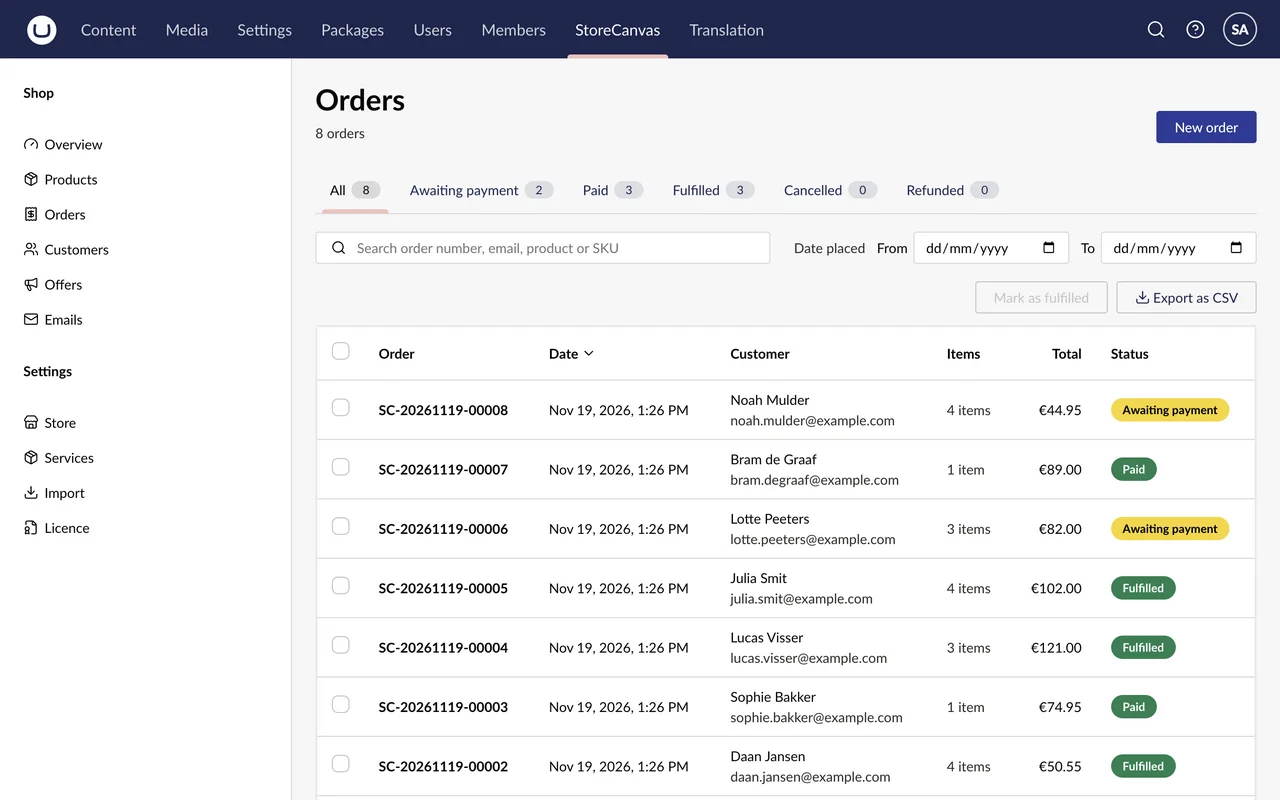
Orders
Search by order number, email, product or SKU, pick the dates, and mark several orders fulfilled at once. The list exports as CSV too.
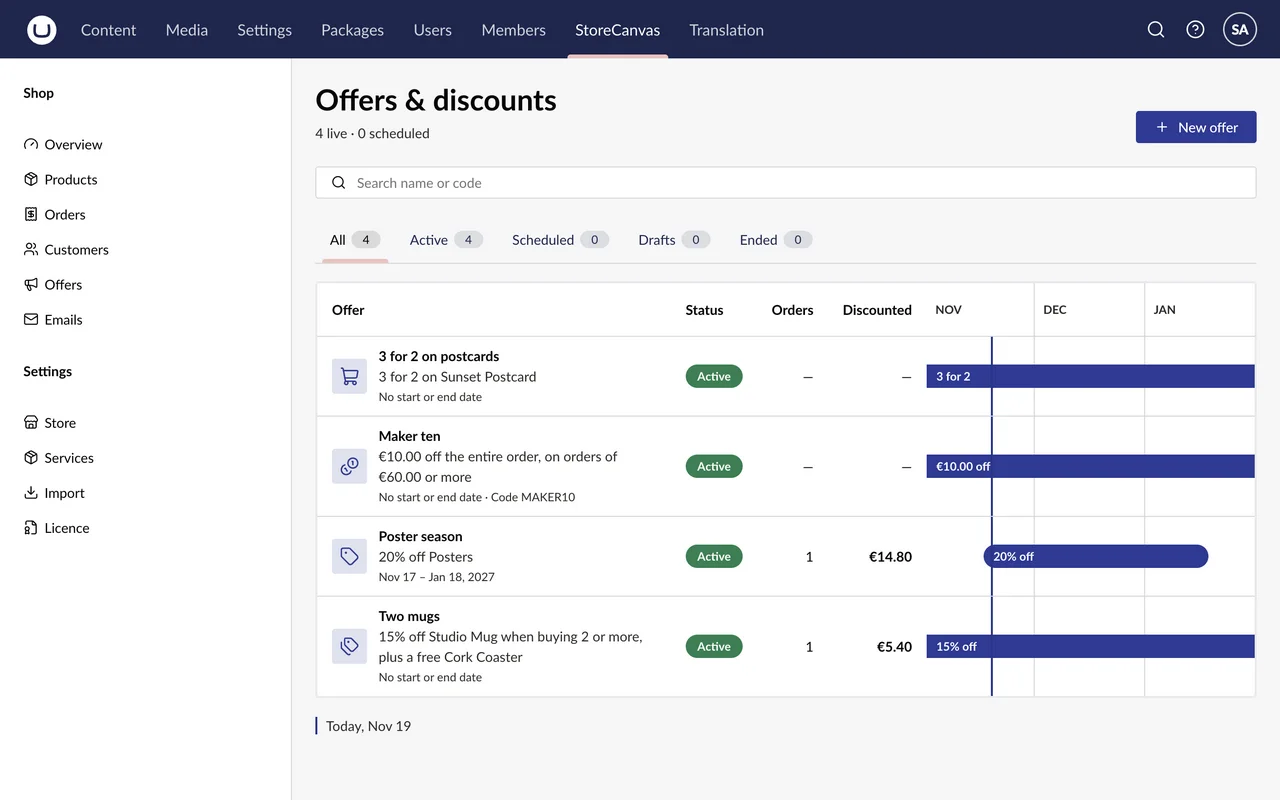
Offers
Percentage or amount off, 3 for 2, bundles, buy 2 or more, free gifts and codes. Each offer is active, scheduled, a draft or ended.
dotnet add package StoreCanvas.Umbraco, and StoreCanvas.Storefront unless the shop is headless.
AddStoreCanvas before CreateUmbracoBuilder, and four lines for the API and the shop's pages.
The Overview's checklist: store details, payments, shipping, tax, terms, a first product and a test order.
Everything works during the 14-day trial. After it, enter your key under StoreCanvas → Settings → Licence.
Umbraco 17.8.1 or newer, on .NET 10.
Yes. A shop runs a 14-day trial, with everything working, from the first time it checks its licence: usually when you first open the StoreCanvas section.
Without a licence the shop takes no new orders. Orders already placed still get paid, and the rest of the shop and the backoffice keep working.
Three. A domain covers its www; any other subdomain takes a domain of its own. You can add room for more in the portal.
Yes. A valid key works on localhost, and localhost doesn't take one of the three domains.
Yes. Install only StoreCanvas.Umbraco and build your pages on the public API under /api/storecanvas.
Not yet. Until then a minor version, like 0.2.0, can change code that uses the package; the changelog lists every such change.
The demo shop on this site runs StoreCanvas with fictional products and test payments: nothing is for sale.